SocialTech VPN App Introduction
SocialTech VPN is built for people who just want their favorite apps and sites to work, no matter where they are. Whether certain social platforms are blocked, public WiFi feels sketchy, or you simply do not want your browsing tracked, this app steps in as a simple privacy layer on your Android phone.
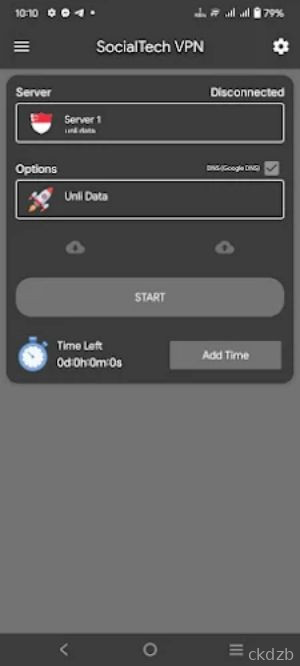
Instead of drowning you in complicated settings, SocialTech VPN focuses on quick connection and stable servers. Open the app, tap to connect, and your traffic is routed through secure VPN servers so your real IP and location are hidden from prying eyes.
It is especially handy if you rely on messaging, calls, or social feeds that sometimes get restricted by networks or local rules. With SocialTech VPN running, those apps usually behave as if nothing is blocked at all.
SocialTech VPN App Features
1. One-Tap Connect: Start a secure VPN session with a single tap, without digging through confusing menus.
2. Secure Encryption: Protect your data with encrypted tunnels that make it harder for snoops on public WiFi to monitor what you are doing.
3. Multiple Server Options: Switch between different server locations to find smoother speeds or reach region-locked content.
4. Works With Social Apps: Keep popular social networks, messaging tools, and video platforms accessible even when your network tries to block them.
5. Background Protection: Let the VPN run quietly in the background so your apps stay protected while you browse, chat, or stream.
SocialTech VPN App Highlights
🔥 Simple interface - Clean layout that makes it easy for anyone to turn the VPN on and off without extra clutter.
🔒 Privacy focus - Hides your IP address and helps reduce tracking from networks and websites.
🚀 Stable connections - Designed to keep a steady link so your chats and calls are less likely to drop.
💡 Smart for public WiFi - Handy when you connect to coffee shop, airport, or hotel networks that you do not fully trust.
⭐ Good for social browsing - Helps keep feeds loading and messages sending even on restricted networks.
SocialTech VPN App Usage
Open the app and allow the basic VPN permission so Android can route your traffic through SocialTech VPN.
Tap the main connect button to start a secure session, then wait a moment until the status shows that you are connected.
Switch servers if your connection feels slow, testing different locations until you find one that loads your apps quickly.
Leave the VPN running while you use social media, messaging, and browsers so they all benefit from the protected tunnel.
Disconnect from the VPN when you no longer need privacy or unblocking, especially if you want to return to your normal local routing.
SocialTech VPN App Conclusion
SocialTech VPN is aimed at Android users who want a straightforward way to keep social apps reachable and traffic more private. It skips the technical jargon and lets you focus on what matters: staying connected to the people and platforms you care about.
If you often run into blocked sites, unreliable networks, or just feel uneasy on public WiFi, having SocialTech VPN in your pocket can make day-to-day browsing a lot less stressful. Install it, connect when needed, and let it quietly handle the privacy work in the background.
FAQ
Is SocialTech VPN free to use on Android?
SocialTech VPN is designed as a simple Android VPN tool. Depending on the build you install, it may offer free access, paid plans, or a mix of both, such as limited free servers and premium locations. Always check inside the app for current pricing or upgrade options.
Does SocialTech VPN work with social media and chat apps?
Yes, that is one of the main use cases. Once you connect to SocialTech VPN, your traffic is routed through its servers, which often helps social media feeds, messaging apps, and call features work on networks where they are normally restricted or unstable.
Will SocialTech VPN slow down my internet connection?
Any VPN can affect speed because your data travels through an extra server. With SocialTech VPN, speeds depend on your base connection and the server you choose. If things feel slow, try switching to a different server location or disconnect when you no longer need the VPN.